
级联下拉框的设计与实现 Vue
Vue,级联下拉框的设计与实现,博智网带你了解详细信息 。
目录
- 1.数据库设计
- 2.前端页面
- 3.一个完整的demo
在前端开发中 , 级联选择框是经常用到的 , 这样不仅可以增加用户输入的友好性 , 还能减少前后端交互的数据量 。本文以elementUI为例 , 使用其余UI组件大致思想也都相同 。
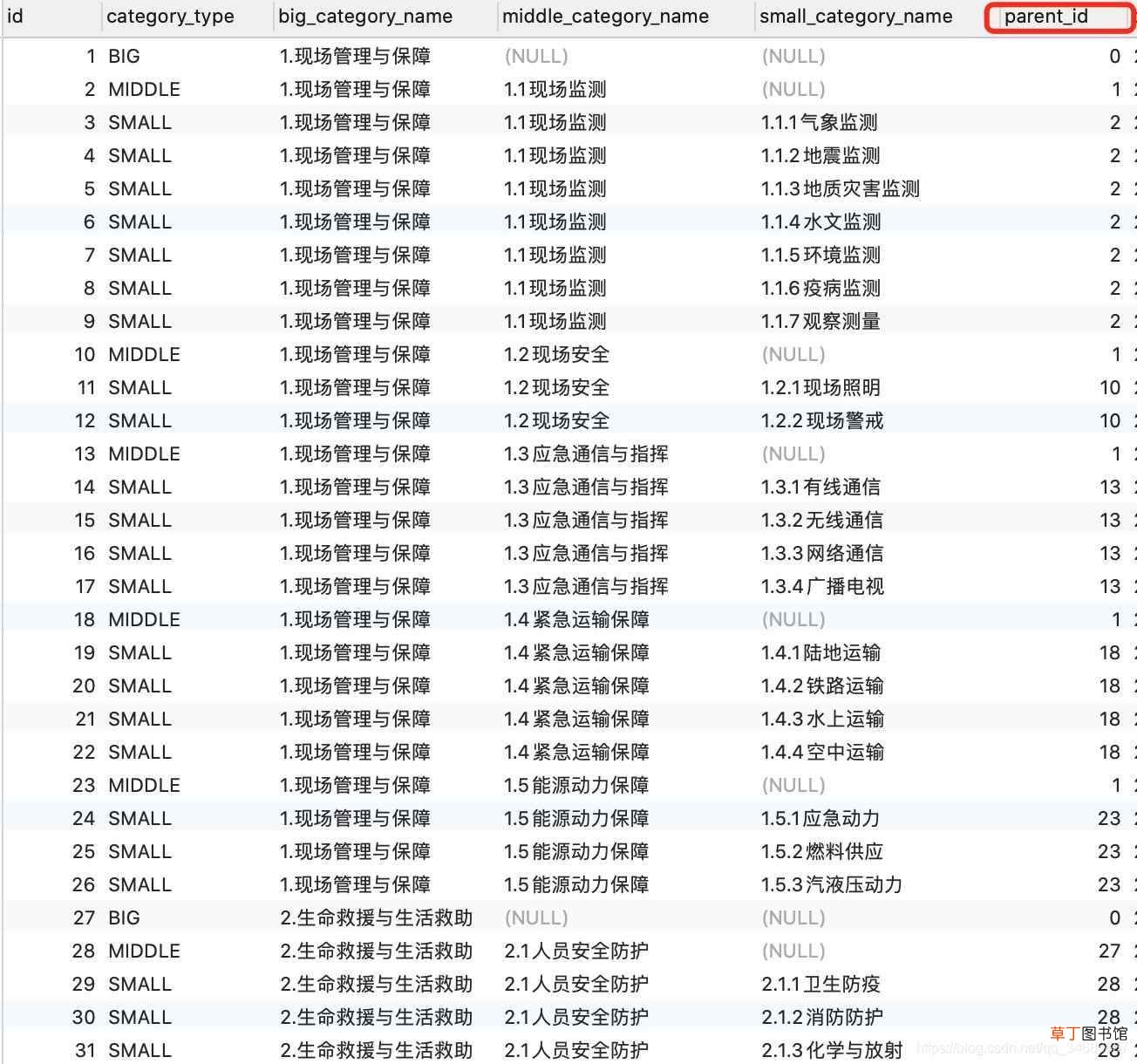
1.数据库设计 所有的相关数据皆可存在一张表中 , 这样数据就可以不受层级的限制 。
表结构可以参考如下建表SQL:
CREATE TABLE `supplies_type` (`id` int(11) NOT NULL AUTO_INCREMENT,`category_type` varchar(64) NOT NULL COMMENT '类别种类:大类、中类、小类',`big_category_name` varchar(64) NOT NULL COMMENT '大类名称',`middle_category_name` varchar(64) DEFAULT NULL COMMENT '中类名称',`small_category_name` varchar(64) DEFAULT NULL COMMENT '小类名称',`parent_id` int(11) DEFAULT NULL,`create_time` timestamp NULL DEFAULT CURRENT_TIMESTAMP,`create_user_name` varchar(64) DEFAULT NULL COMMENT '创建人用户名',`update_time` timestamp NULL DEFAULT NULL ON UPDATE CURRENT_TIMESTAMP,`is_deleted` tinyint(1) DEFAULT '0' COMMENT '是否删除 , 1表示已删除',PRIMARY KEY (`id`)) ENGINE=InnoDB AUTO_INCREMENT=1 DEFAULT CHARSET=utf8mb4;
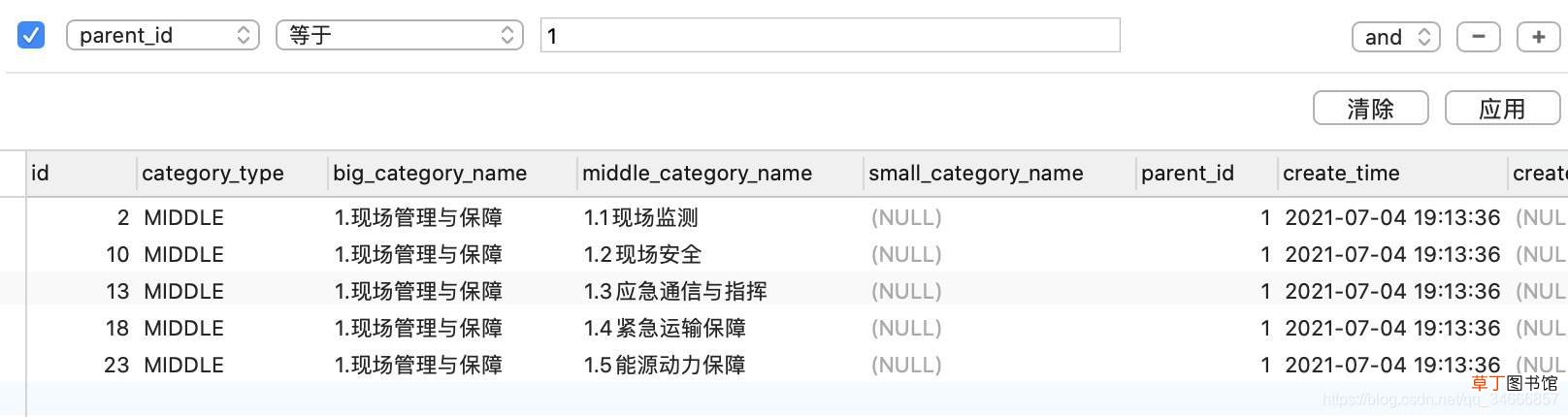
数据库截图如下图所示 , 注:本系统为了减少查询次数 , 故冗余了一些字段 , 读者可根据自己的需求调整 。
文章插图

文章插图
文章插图

文章插图
文章插图
Html代码如下:
<p class="app-container"><span style="margin-left:120px;margin-right: 20px;width: 150px;display: inline-block;">大类:</span><el-select v-model="big" placeholder="请选择" @change="getSuppliesType(big)" style="width: 19%;"><el-optionv-for="item in bigTypes":key="item.bigCategoryName":label="item.bigCategoryName":value="https://www.yf-zs.com/redian/item.id"></el-option></el-select><span style="margin-left:120px;margin-right: 20px; width: 150px;display: inline-block;">中类:</span><el-select v-model="middle" placeholder="请选择" @change="getSuppliesType(middle)" style="width: 19%;"><el-optionv-for="item in middleTypes":key="item.middleCategoryName":label="item.middleCategoryName":value="https://www.yf-zs.com/redian/item.id"></el-option></el-select><br><br><br><span style="margin-left:120px;margin-right: 20px;width: 150px; margin-top:20px; display: inline-block;">小类:</span><el-select v-model="small" placeholder="请选择" style="width: 19%;"><el-optionv-for="item in smallTypes":key="item.smallCategoryName":label="item.smallCategoryName":value="https://www.yf-zs.com/redian/item.id"></el-option></el-select></p>
上面的item.smallCategoryName、item.smallCategoryName数据为后端从数据库中查询出来的数据(驼峰命名) , 后端只负责查询、并返回结果 。
Vue中数据定义如下:
data() {return {big: '',bigTypes: null,middle: '',middleTypes: null,small: '',smallTypes: null}},
在页面初始化时 , 自动获取大类列表:
created() {this.getSuppliesType(0)},
页面中的getSuppliesType方法如下:
getSuppliesType(id) {this.listLoading = trueconst queryData = https://www.yf-zs.com/redian/{parentId: id}//此处的调用后端接口按照自己的调用方式写即可//此处的getSuppliersType是项目中自己封装的util中的方法//如果请求方式是post , JSON.stringify(queryData)//如果请求方式是get , queryDatagetSuppliersType(JSON.stringify(queryData)).then(response => {console.log(response)console.log(response.data[0].categoryType)//根据type自动向三个下拉框赋值if (response.data[0].categoryType ==='BIG') {this.bigTypes = response.data} else if (response.data[0].categoryType === 'MIDDLE') {this.middleTypes = response.data} else {this.smallTypes = response.data}this.listLoading = false}).catch(function (error) {console.log(error)this.listLoading = false})},
3.一个完整的demo【级联下拉框的设计与实现 Vue】 下面这个页面为完成代码 , 其中的数据为部分数据 , 后台接口获取使用JS来完成 。
<template><p class="app-container"><span style="margin-left:120px;margin-right: 20px;width: 150px;display: inline-block;">大类:</span><el-select v-model="big" placeholder="请选择" @change="getSuppliesType(big)" style="width: 19%;"><el-optionv-for="item in bigTypes":key="item.bigCategoryName":label="item.bigCategoryName":value="https://www.yf-zs.com/redian/item.id"></el-option></el-select><span style="margin-left:120px;margin-right: 20px; width: 150px;display: inline-block;">中类:</span><el-select v-model="middle" placeholder="请选择" @change="getSuppliesType(middle)" style="width: 19%;"><el-optionv-for="item in middleTypes":key="item.middleCategoryName":label="item.middleCategoryName":value="https://www.yf-zs.com/redian/item.id"></el-option></el-select><br><br><br><span style="margin-left:120px;margin-right: 20px;width: 150px; margin-top:20px; display: inline-block;">小类:</span><el-select v-model="small" placeholder="请选择" style="width: 19%;"><el-optionv-for="item in smallTypes":key="item.smallCategoryName":label="item.smallCategoryName":value="https://www.yf-zs.com/redian/item.id"></el-option></el-select><br><br><br><el-button type="primary" round style="margin-left:280px" @click.native.prevent="commit">添加</el-button><el-button type="primary" round style="margin-left:100px" @click.native.prevent="cancel">取消</el-button></p></template><script>export default {filters: {parseTime(timestamp) {return parseTime(timestamp, null)}},data() {return {big: '',bigTypes: null,middle: '',middleTypes: null,small: '',smallTypes: null,dataList: [{"id":1,"categoryType":"BIG","bigCategoryName":"1.现场管理与保障","middleCategoryName":null,"smallCategoryName":null,"parentId":0,"createTime":"2021-07-04T11:13:36.000+0000","createUserName":null,"updateTime":"2021-07-04T13:34:31.000+0000","isDeleted":false},{"id":27,"categoryType":"BIG","bigCategoryName":"2.生命救援与生活救助","middleCategoryName":null,"smallCategoryName":null,"parentId":0,"createTime":"2021-07-04T11:13:36.000+0000","createUserName":null,"updateTime":null,"isDeleted":false},{"id":2,"categoryType":"MIDDLE","bigCategoryName":"1.现场管理与保障","middleCategoryName":"1.1现场监测","smallCategoryName":null,"parentId":1,"createTime":"2021-07-04T11:13:36.000+0000","createUserName":null,"updateTime":null,"isDeleted":false},{"id":10,"categoryType":"MIDDLE","bigCategoryName":"1.现场管理与保障","middleCategoryName":"1.2现场安全","smallCategoryName":null,"parentId":1,"createTime":"2021-07-04T11:13:36.000+0000","createUserName":null,"updateTime":null,"isDeleted":false},{"id":3,"categoryType":"SMALL","bigCategoryName":"1.现场管理与保障","middleCategoryName":"1.1现场监测","smallCategoryName":"1.1.1气象监测","parentId":2,"createTime":"2021-07-04T11:13:36.000+0000","createUserName":null,"updateTime":null,"isDeleted":false},{"id":4,"categoryType":"SMALL","bigCategoryName":"1.现场管理与保障","middleCategoryName":"1.1现场监测","smallCategoryName":"1.1.2地震监测","parentId":2,"createTime":"2021-07-04T11:13:36.000+0000","createUserName":null,"updateTime":null,"isDeleted":false},{"id":5,"categoryType":"SMALL","bigCategoryName":"1.现场管理与保障","middleCategoryName":"1.1现场监测","smallCategoryName":"1.1.3地质灾害监测","parentId":2,"createTime":"2021-07-04T11:13:36.000+0000","createUserName":null,"updateTime":null,"isDeleted":false},{"id":6,"categoryType":"SMALL","bigCategoryName":"1.现场管理与保障","middleCategoryName":"1.1现场监测","smallCategoryName":"1.1.4水文监测","parentId":2,"createTime":"2021-07-04T11:13:36.000+0000","createUserName":null,"updateTime":null,"isDeleted":false},{"id":7,"categoryType":"SMALL","bigCategoryName":"1.现场管理与保障","middleCategoryName":"1.1现场监测","smallCategoryName":"1.1.5环境监测","parentId":2,"createTime":"2021-07-04T11:13:36.000+0000","createUserName":null,"updateTime":null,"isDeleted":false},{"id":8,"categoryType":"SMALL","bigCategoryName":"1.现场管理与保障","middleCategoryName":"1.1现场监测","smallCategoryName":"1.1.6疫病监测","parentId":2,"createTime":"2021-07-04T11:13:36.000+0000","createUserName":null,"updateTime":null,"isDeleted":false},{"id":9,"categoryType":"SMALL","bigCategoryName":"1.现场管理与保障","middleCategoryName":"1.1现场监测","smallCategoryName":"1.1.7观察测量","parentId":2,"createTime":"2021-07-04T11:13:36.000+0000","createUserName":null,"updateTime":null,"isDeleted":false},{"id":11,"categoryType":"SMALL","bigCategoryName":"1.现场管理与保障","middleCategoryName":"1.2现场安全","smallCategoryName":"1.2.1现场照明","parentId":10,"createTime":"2021-07-04T11:13:36.000+0000","createUserName":null,"updateTime":null,"isDeleted":false},{"id":12,"categoryType":"SMALL","bigCategoryName":"1.现场管理与保障","middleCategoryName":"1.2现场安全","smallCategoryName":"1.2.2现场警戒","parentId":10,"createTime":"2021-07-04T11:13:36.000+0000","createUserName":null,"updateTime":null,"isDeleted":false},{"id":28,"categoryType":"MIDDLE","bigCategoryName":"2.生命救援与生活救助","middleCategoryName":"2.1人员安全防护","smallCategoryName":null,"parentId":27,"createTime":"2021-07-04T11:13:36.000+0000","createUserName":null,"updateTime":null,"isDeleted":false},{"id":34,"categoryType":"MIDDLE","bigCategoryName":"2.生命救援与生活救助","middleCategoryName":"2.2生命搜救与营救","smallCategoryName":null,"parentId":27,"createTime":"2021-07-04T11:13:36.000+0000","createUserName":null,"updateTime":"2021-07-04T13:03:23.000+0000","isDeleted":false},{"id":29,"categoryType":"SMALL","bigCategoryName":"2.生命救援与生活救助","middleCategoryName":"2.1人员安全防护","smallCategoryName":"2.1.1卫生防疫","parentId":28,"createTime":"2021-07-04T11:13:36.000+0000","createUserName":null,"updateTime":null,"isDeleted":false},{"id":30,"categoryType":"SMALL","bigCategoryName":"2.生命救援与生活救助","middleCategoryName":"2.1人员安全防护","smallCategoryName":"2.1.2消防防护","parentId":28,"createTime":"2021-07-04T11:13:36.000+0000","createUserName":null,"updateTime":null,"isDeleted":false},{"id":31,"categoryType":"SMALL","bigCategoryName":"2.生命救援与生活救助","middleCategoryName":"2.1人员安全防护","smallCategoryName":"2.1.3化学与放射","parentId":28,"createTime":"2021-07-04T11:13:36.000+0000","createUserName":null,"updateTime":null,"isDeleted":false},{"id":32,"categoryType":"SMALL","bigCategoryName":"2.生命救援与生活救助","middleCategoryName":"2.1人员安全防护","smallCategoryName":"2.1.4防高空坠落","parentId":28,"createTime":"2021-07-04T11:13:36.000+0000","createUserName":null,"updateTime":null,"isDeleted":false},{"id":33,"categoryType":"SMALL","bigCategoryName":"2.生命救援与生活救助","middleCategoryName":"2.1人员安全防护","smallCategoryName":"2.1.5通用防护","parentId":28,"createTime":"2021-07-04T11:13:36.000+0000","createUserName":null,"updateTime":null,"isDeleted":false},{"id":35,"categoryType":"SMALL","bigCategoryName":"2.生命救援与生活救助","middleCategoryName":"2.2生命搜救与营救","smallCategoryName":"2.2.1生命搜索","parentId":34,"createTime":"2021-07-04T11:13:36.000+0000","createUserName":null,"updateTime":null,"isDeleted":false},{"id":36,"categoryType":"SMALL","bigCategoryName":"2.生命救援与生活救助","middleCategoryName":"2.2生命搜救与营救","smallCategoryName":"2.2.2攀岩营救","parentId":34,"createTime":"2021-07-04T11:13:36.000+0000","createUserName":null,"updateTime":null,"isDeleted":false},{"id":37,"categoryType":"SMALL","bigCategoryName":"2.生命救援与生活救助","middleCategoryName":"2.2生命搜救与营救","smallCategoryName":"2.2.3破拆起重","parentId":34,"createTime":"2021-07-04T11:13:36.000+0000","createUserName":null,"updateTime":null,"isDeleted":false},{"id":38,"categoryType":"SMALL","bigCategoryName":"2.生命救援与生活救助","middleCategoryName":"2.2生命搜救与营救","smallCategoryName":"2.2.4水下营救","parentId":34,"createTime":"2021-07-04T11:13:36.000+0000","createUserName":null,"updateTime":null,"isDeleted":false},{"id":39,"categoryType":"SMALL","bigCategoryName":"2.生命救援与生活救助","middleCategoryName":"2.2生命搜救与营救","smallCategoryName":"2.2.5通用工具","parentId":34,"createTime":"2021-07-04T11:13:36.000+0000","createUserName":null,"updateTime":null,"isDeleted":false}]}},created() {this.getSuppliesType(0)},methods: {getSuppliesType(id) {const queryData = https://www.yf-zs.com/redian/{parentId: id}//此处为js模拟 , 真实数据的获取还需要后台接口的支持getSuppliersType(JSON.stringify(queryData)).then(response => {console.log(response)console.log(response.data[0].categoryType)//存放此次查询结果let tmpList = []this.dataList.forEach((item, index) => {if(item.parentId === id){tmpList.push(item)}})if (tmpList[0].categoryType ==='BIG') {this.bigTypes = tmpList} else if (response.data[0].categoryType === 'MIDDLE') {this.middleTypes = tmpList} else {this.smallTypes = tmpList}}).catch(function (error) {console.log(error)})},commit() {console.log("点击了提交按钮")},cancel() {this.$router.go(-1)}}}</script>
- 全框的眼镜框怎么拆
- 数码相框购买提示是什么
- XR铝制边框掉漆么
- 裱画是指什么
- 全民农场头像边框怎么换
- 卫生间木门框烂了怎么修补 卫生间木门如何防水
- 高位下拉的标准动作
- cdr文本框的虚线该咋地才可以去掉
- 高位下拉练哪些肌肉
- cdr要如何才可以去掉文本框的虚线