
微信小程序计算器实例详解
微信小程序计算器实例详解,博智网带你了解详细信息 。
小程序计算器实例,供大家参考,具体内容如下
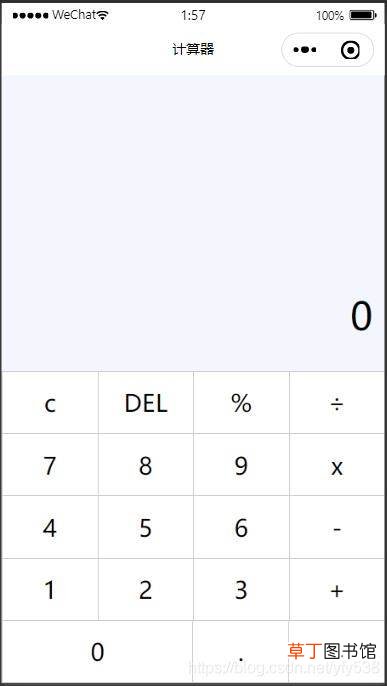
文章插图
文章插图
index.wxml
<view class="content"><view class="num">{{num}}</view><view class="operotor">{{op}}</view></view><view class="entry"><view><view class="item" bindtap="resetBtn">c</view><view class="item" bindtap="delBtn">DEL</view><view class="item" bindtap="opBtn" data-val="%">%</view><view class="item" bindtap="opBtn" data-val="/">÷</view></view><view><view class="item" bindtap="numBtn" data-val="7">7</view><view class="item" bindtap="numBtn" data-val="8">8</view><view class="item" bindtap="numBtn" data-val="9">9</view><view class="item" bindtap="opBtn" data-val="*">x</view></view><view><view class="item" bindtap="numBtn" data-val="4">4</view><view class="item" bindtap="numBtn" data-val="5">5</view><view class="item" bindtap="numBtn" data-val="6">6</view><view class="item" bindtap="opBtn" data-val="-">-</view></view><view><view class="item" bindtap="numBtn" data-val="1">1</view><view class="item" bindtap="numBtn" data-val="2">2</view><view class="item" bindtap="numBtn" data-val="3">3</view><view class="item" bindtap="opBtn" data-val="+">+</view></view><view><view class="item tow" bindtap="numBtn" data-val="0">0</view><view class="item one" bindtap="dotBtn" data-val=".">.</view><view class="item one" bindtap="opBtn" data-val="=">=</view></view></view>
index.css
【微信小程序计算器实例详解】page {display: flex;flex-direction: column;height: 100%;}.content {flex: 1;background-color: #f3f6fe;position: relative;}.content .num {position: absolute;font-size: 27pt;bottom: 5vh;right: 3vw;}.content .operotor {font-size: 15pt;position: absolute;bottom: 1vh;right: 3vw;}.entry {flex: 1;font-size: 17pt;border-top: 1rpx solid #ccc;}.entry .item {flex: 1;padding: 30rpx 0;text-align: center;flex-basis: 25%;border-left: 1rpx solid #ccc;border-bottom: 1rpx solid #ccc;}.entry > view {display: flex;}.entry > view .tow {flex: 2;}.entry > view .one {flex: 1;}
index.js
Page({data: {num: "",// 存储数字op: ""//存储运算符},result: null,isClear: false,numBtn: function(e) {var num = e.target.dataset.val//console.log(num) 得到data-val的值console.log(this.isClear)if (this.data.num === "0" || this.isClear) {this.setData({ num: num })this.isClear = false} else {this.setData({ num: this.data.num + num })}},opBtn: function(e) {var op = this.data.opvar num = Number(this.data.num)this.setData({ op: e.target.dataset.val })if (this.isClear) {return}this.isClear = trueif (this.result === null) {this.result = numreturn}if (op === "+") {this.result = this.result + num} else if (op === "-") {this.result = this.result - num} else if (op === "*") {this.result = this.result * num} else if (op === "/") {this.result = this.result / num} else if (op === "%") {this.result = this.result % num}this.setData({ num: this.result })},dotBtn: function() {if (this.isClear) {this.setData({ num: "0." })this.isClear = falsereturn}if (this.data.num.indexOf(".") >= 0) {return}this.setData({ num: this.data.num + "." })},delBtn: function() {var num = this.data.num.substr(0, this.data.num.length - 1)this.setData({ num: num === "" ? "0" : num })},resetBtn: function() {this.result = nullthis.isClear = falsethis.setData({ num: "0", op: "" })}})
以上就是本文的全部内容,希望对大家的学习有所帮助,也希望大家多多支持趣讯吧 。
- 12w灯泡一小时耗电量
- 小天才电话手表微聊怎么删除
- 苹果13桌面小组件照片怎么设置
- 1寸直径水泵每小时能抽多少吨水
- 999等于6怎么算
- 微信名片关闭手机号码
- 野生小榛子没有开口怎么剥开
- 夏天和面几个小时可以发
- 如何防止苹果变色
- lg空调售后服务电话 LG空调24小时全国维修电话